
Official government website affiliated with the government of the Kingdom of Saudi Arabia


Official Saudi government website links end with gov.sa
All official educational website links in the Kingdom of Saudi Arabia end with sch.sa or edu.sa

Government websites use HTTPS protocol for encryption and security.
Secure websites in the Kingdom of Saudi Arabia use HTTPS protocol for encryption.


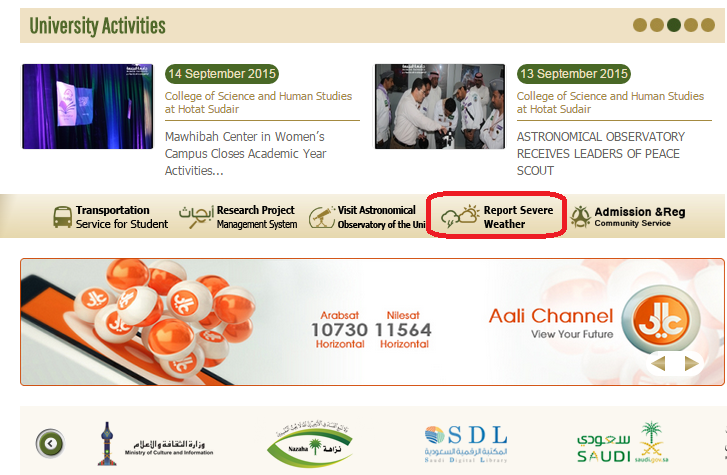
ADDING AN ICON FOR REPORTING BAD WEATHER CONDITIONS THAT MAY HINDER STUDY
 Posted in 2015-10-11
For the purpose of the development of the tools supporting the educational process, the General Administration of Facilities and Services (GAFS), in coordination with the Deanship of Information Technology, has added an electronic icon for reporting unsettled weather phenomena that may hinder the study at Majmaah University and prevent university students from reaching their colleges. Dr. Mosallam Al-Dossari said “As part of the e-services provided by the agency and the university for its students, Majmaah University has sought to develop an electronic window linked to the university transport system. This window allows reporting adverse weather conditions that may affect the study on campus and prevent students from attending their classes.” “This service allows the student or the citizen to send his/her note concerning bad weather conditions electronically to the university website,” he added. He continued “This service is useful as the distance between university colleges and some students’ houses is long.” The report will be referred to the Emergency Unit at the GAFS, which observes the weather conditions and submit a report to the University Agency for taking a suitable decision that serves students and guarantees their safety. The service has been added to the apple and play stores, and linked to the university transport system. Access to the report webpage can be through this link: http://utd.mu.edu.sa/weather To download the application from apple store, go to: https://appsto.re/sa/ElOw9.i To download the application from play store, go to: https://play.google.com/store/apps/details?id=sa.edu.mu.transport
Share your opinion and contribute to improvement.
0 of 31 visitors liked the page content (0% Visitor Satisfaction Index)